Safety information
This information applies to the installation, operation, and maintenance of IOZER devices.
Installation by qualified personnel
Installation, wiring, and commissioning may only be carried out by qualified personnel.
Direct connection to mains voltage, such as 230 V AC, is not permitted.
General information
- Operate the device only within the specified limits.
- Use the device only in suitable enclosed operating locations.
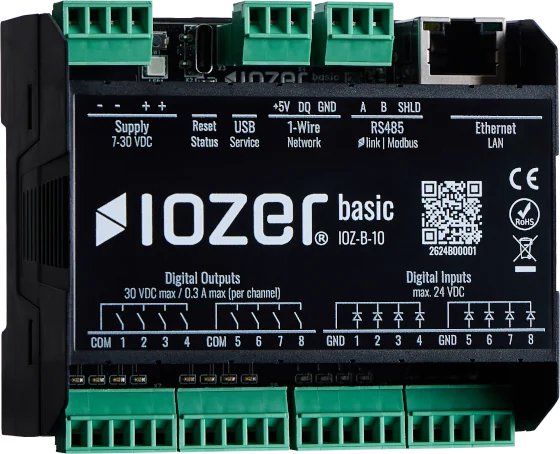
- Observe the electrical limits for the power supply, inputs, and outputs.
- Disconnect the system from its power supply before wiring or connection work.
- Check the wiring before commissioning.
IOZER basic operating limits
| Parameter | Limit |
|---|---|
| Power supply | 7–30 V DC |
| Digital outputs | max. 30 V DC, max. 300 mA per channel, max. 10 VA |
| Digital inputs | max. 24 V DC |
| Degree of protection | IP20 |
| Operating temperature | 0 °C to +50 °C |
| Humidity | 10–90%, non-condensing |
Wireless and IT security
Change the default password when commissioning the device for the first time.
Use strong, complex passwords.
Minimum distance according to the EMF assessment
During installation and operation, maintain a minimum distance of 20 cm between the antenna and persons.
- Wi-Fi operates in the 2.4 GHz band according to IEEE 802.11 b/g/n.
- WPA2 and WPA3 are supported for Wi-Fi connections.
- Device authentication with the cloud service is certificate-based.
- Use HTTPS for the web interface and API access. Instructions for configuring the certificate and key are available under Network settings.
- Depending on the configuration, MQTT communication can be secured using TLS.
- Firmware is distributed securely and can be updated over the air or by uploading a file through the web interface.
Manufacturer
ROCOON Automation GmbH
Mariazeller Straße 1a
8605 Kapfenberg
Austria
Website: https://iozer.pro
Support: support@iozer.pro