Datapoints
Datapoints form the central logical layer of IOZER basic. They connect hardware, protocols, the web interface, and local logic through a uniform representation of values.
A datapoint describes not only a value but also its meaning, origin, quality, and optional forwarding to other interfaces.
Basic idea
Without datapoints, logic would have to work directly with inputs, outputs, MQTT topics, Modbus registers, or 1-Wire sensors. This quickly becomes difficult to manage when several interfaces interact.
Datapoints decouple the interfaces from the program logic. A datapoint holds the current value and acts as the central hub for its origin, processing, and forwarding.
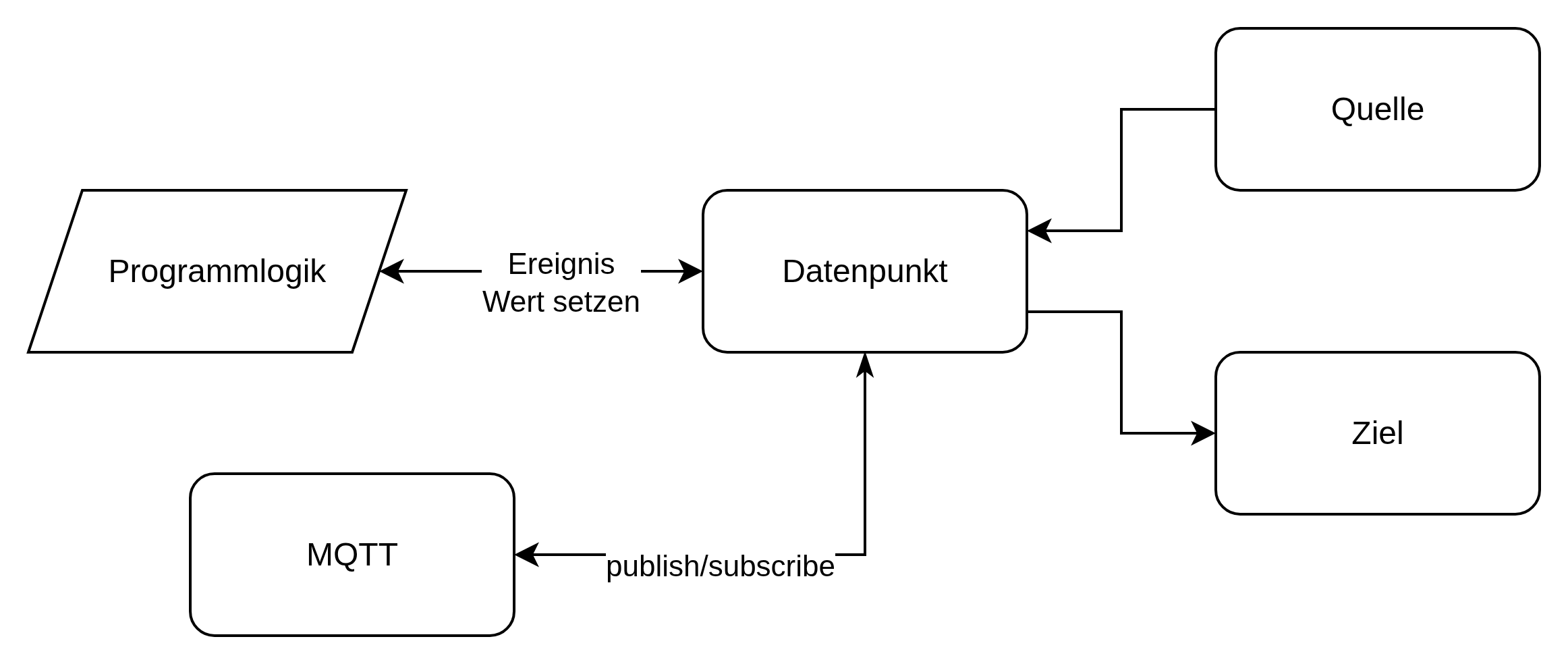
The diagram shows the possible data flows:
| Connection | Function |
|---|---|
| Source → datapoint | A source, such as a digital input, 1-Wire sensor, or Modbus register, updates the value. |
| Datapoint → target | A write command controls the configured target. Source values are forwarded automatically when Forward to data target is enabled. |
| Datapoint → event → program logic | A value change or update can trigger an event in the local program logic. |
| Program logic → set value → datapoint | Program logic can set the value of a datapoint. |
| Datapoint → publish → MQTT | The current value can be published through an MQTT topic. |
| MQTT → subscribe → datapoint | A subscribed MQTT topic can write a new value to the datapoint. |
Program logic therefore works with technical names such as room_temperature, hallway_light, or energy_meter. It does not need to know whether a value originally came from a sensor, an MQTT topic, or a Modbus register. The source or target can later be changed without fundamentally rebuilding the functional logic.
Datapoint structure
A datapoint typically contains:
| Property | Meaning |
|---|---|
| ID | Unique internal number |
| Name | Technical name used by logic and references |
| Label | Human-readable display name |
| Description | Documentation of its purpose |
| Data type | Type of the stored value |
| Unit | Helps with display and interpretation |
| Classification | Functional classification |
| Quality | State of the current value |
| Read binding | Source from which the value is read |
| Write binding | Target to which the value is written |
| Forward to data target | Automatically passes valid source values to the configured target |
| MQTT configuration | Optional publishing or writing over MQTT |
| Persistence | Optional storage of the most recent value |
Data types
| Type | Use |
|---|---|
| Boolean | Switching states, enable signals, binary signals |
| Integer | Counters, steps, integer values |
| Float | Measurements such as temperature, voltage, or power |
| String | Text, states, or external messages |
The data type determines how values are stored, displayed, and processed in JavaScript.
Classifications
Datapoints can be classified by function. This classification helps with display, interpretation, and integration.
| Classification | Typical meaning |
|---|---|
| Other | General value |
| Temperature | Temperature measurement |
| Humidity | Humidity measurement |
| Voltage | Electrical voltage |
| Current | Electrical current |
| Power | Instantaneous power |
| Energy | Consumption or generation |
| State | Operating or switching state |
| Setpoint | Target value |
| Counter | Counted value |
| Text | Text information |
| Lighting | Light state |
| Opening | Door or window contact |
| Motion | Motion detection |
| Presence | Presence detection |
| Problem | Fault indication |
Classification also supports automatic mapping in Home Assistant.
Quality
In addition to its value, a datapoint has a quality state. This allows logic to determine whether a value is current and trustworthy.
| Quality | Meaning |
|---|---|
| Unknown | No reliable state is known yet |
| Good | The value is valid |
| Stale | The value has not been updated for too long |
| Error | An error occurred while reading or writing |
| Unavailable | The source or target is unavailable |
Bindings
Bindings connect a datapoint to a real source or target.
| Binding | Purpose |
|---|---|
| 1-Wire | Read a value from a 1-Wire device |
| Modbus | Read from or write to Modbus |
| MQTT | Read from or write to MQTT |
| Digital input | Read the state, button action, or counter of an input |
| Digital output | Read or write the output state |
A datapoint can have both a read binding and a write binding. Forward to data target automatically passes the first valid source value and subsequent value changes to the target. The option requires a writable datapoint with both a source and a target, and is disabled by default. Forwarding requires active I/O, but no running program.
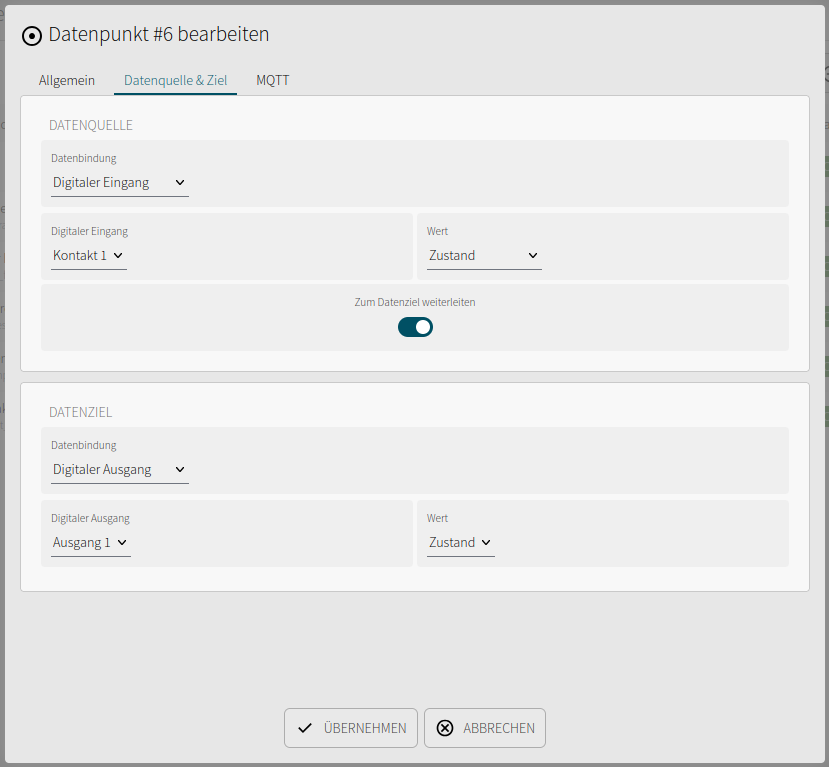
Examples:
- An MQTT topic writes a datapoint and the datapoint switches an output.
- A digital input writes a datapoint and the datapoint is published over MQTT.
- A Modbus register is read into a datapoint and processed by local logic.
- A 1-Wire sensor updates a temperature datapoint that is displayed by the web interface and published over MQTT.
Read and write paths
The read path updates the value of a datapoint.
Sensor / input / protocol -> datapoint
The write path sets the value at a target.
Datapoint -> output / protocol / target system
With Forward to data target disabled, the source only updates the datapoint value. The target then receives explicit write commands, for example through dp.set, the API, or the separate MQTT subscription. If a source is present, the datapoint value remains its feedback; a value written to the target does not automatically replace that feedback.
Automatic forwarding may combine rapid updates into a single write of the latest value. After the first write, unchanged source values do not trigger another target command.
Scaling and conversion
Scale and offset can be used for protocol and sensor values.
logical value = raw value * scale + offset
This is useful when external systems provide values in different units or resolutions.
Examples:
- Modbus provides
235and the datapoint displays23.5 °C. - A raw value is converted from volts to percent.
- An MQTT value is adjusted before local processing.
MQTT scaling
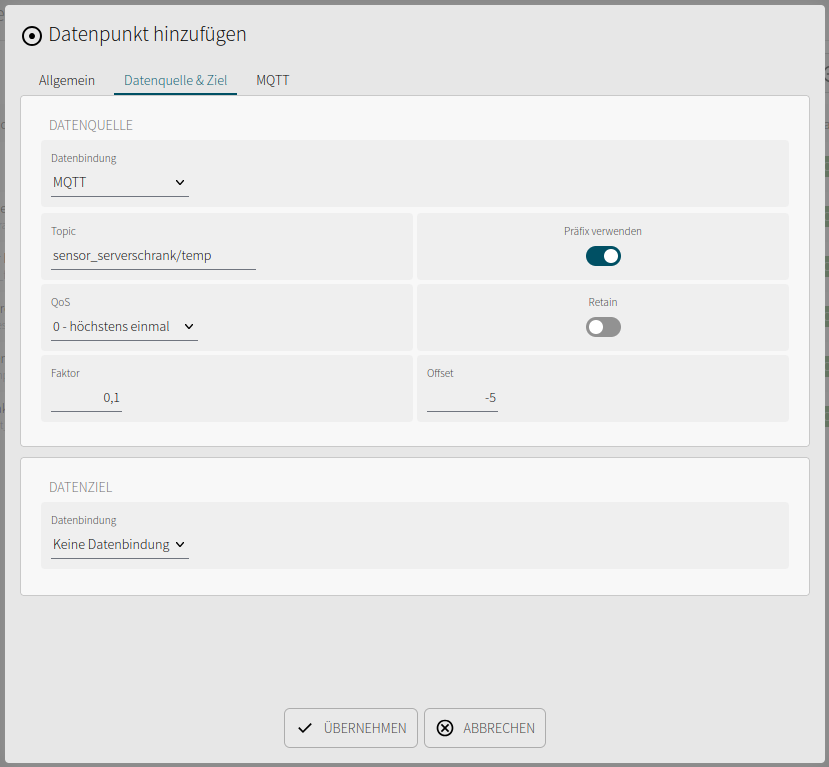
MQTT data sources and MQTT data targets each have their own Factor and Offset. These fields apply to Integer and Float; they are not applied to Boolean or String.
| Direction | Conversion |
|---|---|
| MQTT data source → datapoint | datapoint value = MQTT value × factor + offset |
| Datapoint → MQTT data target | MQTT value = (datapoint value − offset) / factor |
For example, factor 0.1 and offset −5 convert the received MQTT value 250 to the datapoint value 20. Using the same settings at the target converts 20 back to 250.
Defaults are factor 1 and offset 0. A factor of 0 is treated as 1; negative factors are allowed. Integer results are rounded to whole numbers, with halfway values rounded away from zero. An Integer source expects an integer MQTT value before conversion; use Float for fractional input. Non-finite results and values outside the data type's range are rejected.
The datapoint's separate MQTT publish/subscribe settings use its logical value: publication sends the converted datapoint value, while subscription expects a datapoint value and applies only the target conversion when writing. This also applies to Home Assistant.
MQTT
Datapoints can be published or written over MQTT.
For each datapoint, you can define:
- Whether the value is published
- Whether the value may be written over MQTT
- Whether default or custom topics are used
- Whether Retain is enabled
- Which QoS is used
This allows a datapoint to be integrated directly into external systems without implementing custom MQTT handling in local logic.
Persistence
Boolean, Integer, and Float datapoints can be stored persistently. This is useful for values that must remain available after a restart. Strings are not persisted; the persistence option is unavailable for this data type.
Typical examples:
- Operating modes
- Setpoints
- Meter readings
- Most recently selected states
Use persistence selectively. Transient measurements normally do not need to be stored permanently.
Use in local logic
In JavaScript, datapoints are accessed through the dp object.
| Function | Purpose |
|---|---|
dp.get |
Read the current value |
dp.set |
Set a value |
dp.toggle |
Toggle a Boolean value |
dp.state |
Read datapoint status information |
Example:
const temperature = dp.get("room_temperature");

if(temperature > 28) {
  dp.set("fan", true);
}
Datapoints and events
Datapoints can trigger events.
| Event | Meaning |
|---|---|
| Value change | The value changed |
| Value update | The value was updated, even if it remained the same |
| Status change | The quality or validity changed |
| Error | An error occurred at the datapoint |
The difference between a change and an update is important:
- Value changes are suitable for switching logic.
- Value updates are suitable for monitoring, logging, or periodic forwarding.
Further details about execution are available under Events.
Best practices
- Use descriptive technical names, such as
office_room_temperature. - Use labels for human-readable display names.
- Select the appropriate classification and unit.
- Use datapoints as the interface between logic and hardware.
- Avoid direct protocol dependencies in JavaScript when a datapoint is sufficient.
- Use persistence only for values that remain relevant after a restart.
- Deliberately distinguish between value changes and value updates.
Example
A simple room temperature controller can be structured as follows:
- A DS18B20 provides the temperature over 1-Wire.
- The value is written to the datapoint
room_temperature. - An event responds to value changes of this datapoint.
- Local logic compares the value with a setpoint.
- The datapoint
heating_enableis set. - This datapoint switches a digital output and is optionally published over MQTT.
The logic remains understandable because it works with room_temperature and heating_enable rather than bus addresses, terminals, or MQTT topics.