Events
Local logic in IOZER basic is event-based. A program does not run continuously in a loop; it responds to specific triggers.
An event always defines:
- What starts the logic
- Which source the event applies to
- Which code is executed
- Which context data is available to the code
Basic principle
The model follows this pattern:
Trigger -> context -> action
A datapoint is updated, a schedule becomes due, the program starts, or an interface reports an error. The firmware turns this into an event and passes the appropriate context data to the associated Blockly or JavaScript code.
The code runs only when the event is actually triggered. This keeps the logic clear and resource-efficient.
If several events occur simultaneously or in quick succession, they are processed in the order in which they occurred. Execution is sequential: one event finishes completely before the next event starts. The queue holds at most ten pending executions. When it is full, additional events can be dropped. Long waits and rapid event bursts can therefore cause actions to be skipped.
Event program
An IOZER program consists of multiple events. Each event has its own configuration:
| Property | Meaning |
|---|---|
| Active | Defines whether the event is executed |
| Name and description | Documentation within the programming interface |
| Trigger | Event type, such as datapoint, schedule, program, or error |
| Source | Specific datapoint, schedule, error source, or manual parameter |
| Script type | Blockly or JavaScript |
| Code | Logic to be executed |
| Context | Runtime information about the trigger |
Blockly is suitable for visual logic. JavaScript is suitable for more compact or complex processes.
Adding an event
Create new events in the Program section using Add event. The dialog groups the available triggers by functional area.
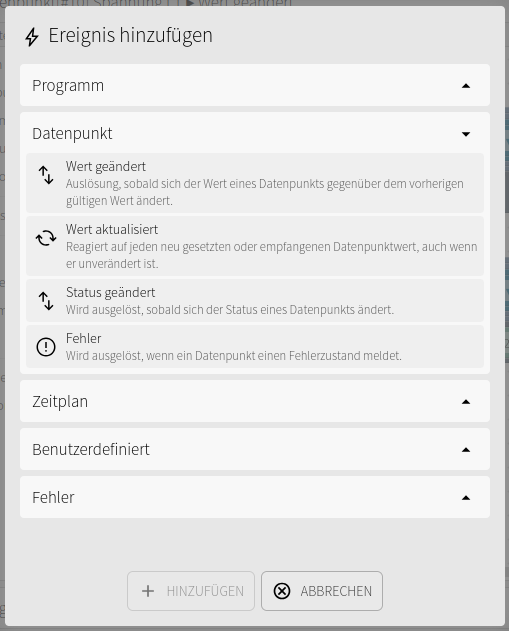
First select the appropriate group, such as Datapoint, Schedule, Custom, or Error. Then select the specific event type.
The following triggers are typically available for datapoints:
- Value changed: triggered when the value differs from the previous valid value.
- Value updated: triggered for every newly set or received value, even if the value is unchanged.
- Status changed: triggered when the status of a datapoint changes.
- Error: triggered when a datapoint reports an error state.
After it is added, the event appears in the event list. It can then be named, enabled, assigned to a source, and programmed using Blockly or JavaScript.
Triggers
The firmware distinguishes between several event groups.
| Group | Typical triggers |
|---|---|
| Program | Program start, program stop |
| Datapoints | Value change, value update, status change, error |
| Schedule | Cron expression |
| Manual | User-defined event |
| Error | 1-Wire error, Modbus error, MQTT error |
Digital inputs, digital outputs, 1-Wire values, Modbus values, and MQTT values do not have their own event groups. They are mapped through datapoints. Local logic therefore responds to the relevant datapoint rather than directly to the hardware or protocol source.
Event and source
Many events can be restricted to a specific source.
Examples:
- Datapoint
hallway_buttonchanges fromfalsetotrue - Datapoint
hallway_lightchanges its state - Datapoint
room_temperatureis updated by a 1-Wire sensor - Datapoint
meter_poweris updated from a Modbus register - Datapoint
mqtt_setpointis written over MQTT - Error source
1-Wirereports a bus or sensor error
If no individual source is selected, an event can respond more generally, depending on its event type.
Context data
During execution, the firmware provides context data. In JavaScript, it is available as ioz_event and ioz_event_context.
General fields:
| Field | Meaning |
|---|---|
event_id |
ID of the triggered event |
trigger_code |
Internal event type |
source_no |
Source number |
timestamp |
Trigger timestamp as Unix time in seconds |
Additional fields are available depending on the event group.
| Event group | Context fields |
|---|---|
| Program | state: 2 on program start, 0 on program stop; timestamp as Unix time in seconds |
| Datapoints | datapoint_id, datapoint_name, value, last_value, valid, last_valid, state, last_state, unit, classification |
| Schedule | cron_expression |
| Manual | param1 through param4 |
| Error | interface, error_code, error_message |
Inputs, outputs, and interface values are available to logic through the context fields of the associated datapoint. Error events for 1-Wire, Modbus, and MQTT instead provide error context for the affected interface.
Program start and stop events also provide the general context fields. Stop handlers finish executing before the JavaScript runtime is shut down.
Actions in code
Local JavaScript programs can interact with the device using global objects.
| Object | Purpose |
|---|---|
system |
Waiting or triggering a restart |
mqtt |
Publishing MQTT messages |
dp |
Reading, writing, toggling, or querying the state of datapoints |
event |
Triggering, stopping, or querying manual events |
log |
Writing debug, informational, warning, or error messages |
Example:
if(ioz_event.datapoint_name = "hallway_button" && ioz_event.value = true) {
  dp.set("hallway_light", true);
  log.info("Hallway light switched on");
}
Datapoints as the central layer
Datapoints are the recommended layer for logic that spans more than one interface.
They are described in detail under Datapoints.
A datapoint can, for example:
- Read from a digital input
- Write to a digital output
- Be published over MQTT
- Be mapped over Modbus
- Be processed in JavaScript
This means that the logic does not need to know whether a value originally came from hardware, MQTT, Modbus, or 1-Wire. It works with a stable logical name.
Manual events
Manual events can be started by other logic. The JavaScript event object is provided for this purpose.
Manual events can receive up to four parameters. These are available in the target event as param1 through param4.
Typical applications:
- Reusable subprocesses
- Delayed actions
- Centralized error handling
- Scenes or operating modes
Schedules
Time-based events use Cron expressions. They can represent recurring or calendar-based actions.
Examples:
- Every day at a specific time
- Every five minutes
- Only on specific weekdays
During execution, the expression is available in the context as cron_expression.
Best practices
- Use datapoints as a stable interface between logic, hardware, and protocols.
- Respond to value changes when an action should run only for actual changes.
- Respond to value updates when identical values must also be processed.
- Keep individual events small and clearly named.
- Use manual events for recurring processes.
- Avoid long blocking processes in an event.
- Document important events with descriptions.
Example sequence
A typical sequence for simple lighting control:
- A digital input writes the datapoint
hallway_button. - A value change on
hallway_buttontriggers an event. - The logic checks the datapoint value.
- The datapoint
hallway_lightis set. - The datapoint
hallway_lightwrites to the digital output. - The new state is optionally published over MQTT.
The logic remains local on the device while still interacting with MQTT, Modbus, 1-Wire, and the web interface.