Blockly
Blockly is the visual programming view of IOZER basic. Logic is assembled from function blocks and assigned to an event. It is particularly suitable for switching logic, simple sequences, comparisons, timing functions, and diagnostic messages.
Interface
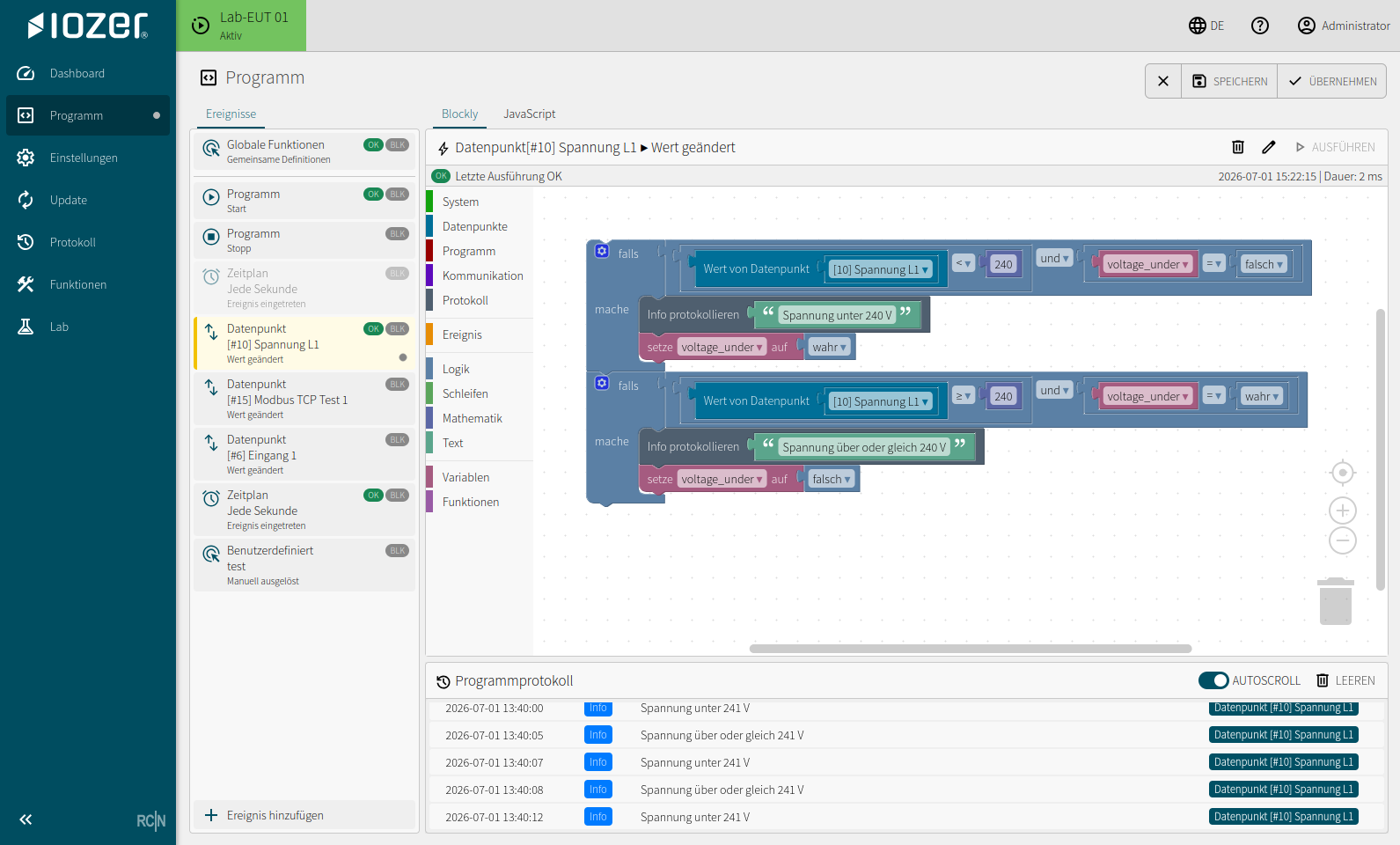
The Blockly view consists of several areas:
- Event list: shows the configured events and their status.
- Editor header: shows the selected event, its most recent runtime status, and actions such as Save, Apply, or Run.
- Block categories: provide blocks for the system, datapoints, program, communication, logging, events, logic, loops, mathematics, text, variables, and functions.
- Workspace: contains the assembled logic for the selected event.
- Program log: shows messages and output from program execution.
When to use Blockly
Blockly is useful when logic should remain clear and understandable without in-depth JavaScript knowledge.
Typical applications:
- Evaluating datapoint states
- Comparing or setting datapoints
- Switching relay outputs through datapoints
- Writing messages to the log
- Creating simple timing and sequence controls
- Translating MQTT or Modbus values into local actions through datapoints
Working with blocks
Drag blocks from the toolbox on the left into the workspace and connect them. Only compatible blocks can be combined meaningfully, which prevents many syntax errors.
Each event should ideally perform a single task. More complex processes can be structured using multiple events or manual events.
Saving and running
Changes are first saved and then applied to the running program. An event can be run or tested individually when supported by its event type.
After applying changes, check the program log. Messages written by the logic help identify states and errors more quickly during operation.
Best practices
- Use unique event names.
- Keep individual Blockly events small and easy to read.
- Use datapoints as the interface between hardware and logic.
- Log important states using short, unambiguous messages.
- Avoid long blocking processes within an event.
The event structure is described under Events.