Network
The Network tab defines how IOZER basic is reached on the local network and which time source is used.
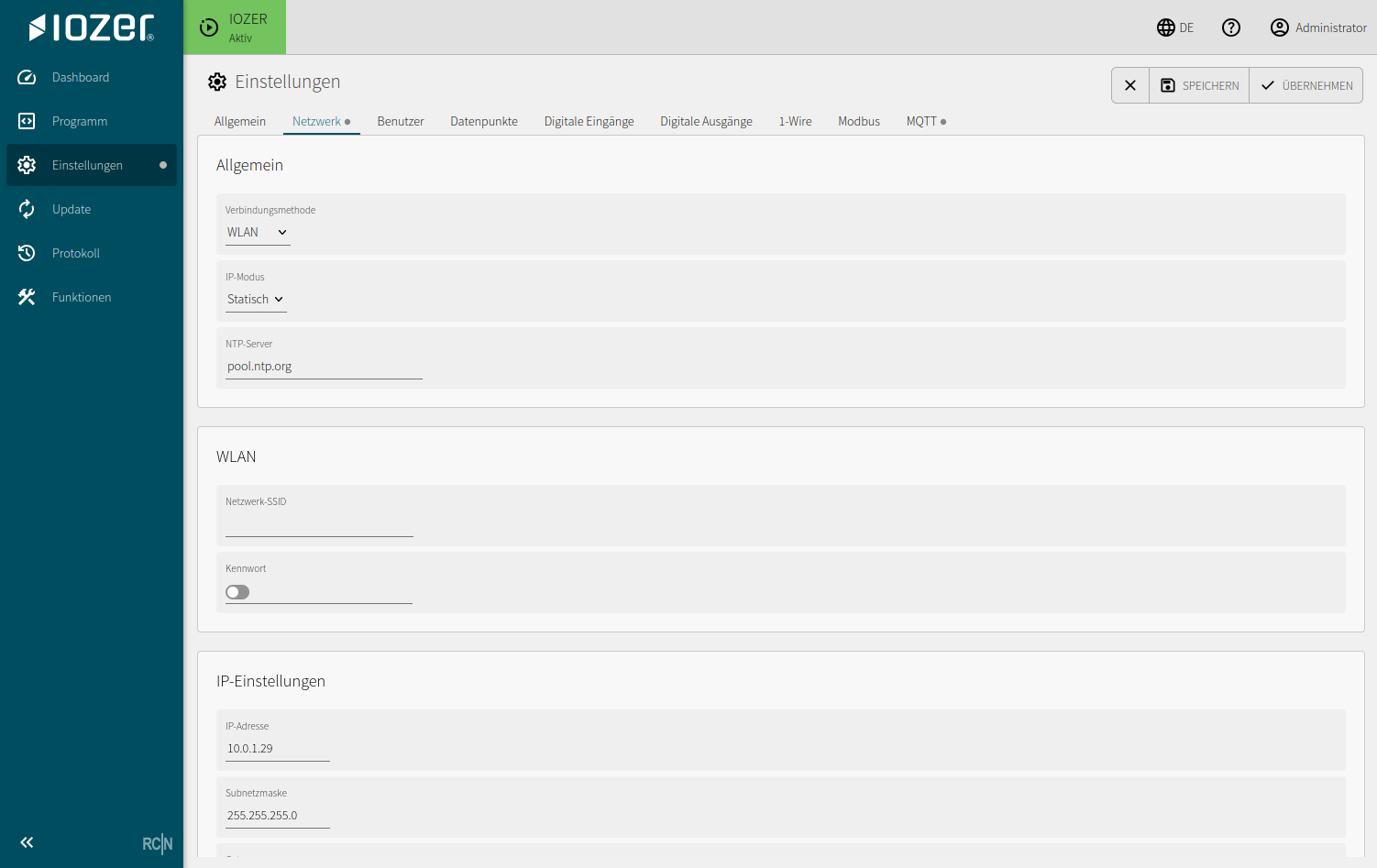
Connection
| Setting | Meaning |
|---|---|
| Connection method | Selects Ethernet or Wi-Fi |
| IP mode | Automatic address assignment using DHCP or a static IP configuration |
| NTP server | Time server used to synchronize the system time |
After changing the network settings, restart the device for the new configuration to take effect.
Web interface
The Web interface section configures HTTP and HTTPS access, their ports, and the required TLS files.
| Setting | Meaning |
|---|---|
| HTTP enabled | Enables unencrypted access to the web interface |
| HTTP port | Port used for HTTP connections; default 80 |
| HTTPS enabled | Enables encrypted access; a valid combination of TLS certificate and TLS key is required |
| HTTPS port | Port used for HTTPS connections; default 443 |
| Redirect to HTTPS | Automatically redirects HTTP requests to HTTPS |
| TLS certificate | Server certificate used by the web interface |
| TLS key | Private key matching the certificate |
| TLS status | Shows whether the certificate and key are present and can be used as a valid combination |
Generate the key and CSR on the device
Use Generate CSR to generate the private key directly on the device. A Certificate Signing Request (CSR) is created at the same time. Have this CSR signed by the intended certificate authority and then upload the issued certificate as the TLS certificate. The key already generated on the device continues to be used.
Use an existing key
Alternatively, upload an existing TLS certificate and its corresponding private key. The certificate and key must match. HTTPS enabled can only be switched on after a valid combination is available.
Use HTTPS for commissioning, service, and production operation. First verify HTTPS access using the intended hostname or IP address. Then enable redirection from HTTP to HTTPS or disable HTTP if the project does not require unencrypted access.
When certificates are issued by an internal certificate authority, its root certificate must be configured as trusted on the service computers and connected systems. Treat private keys as credentials and do not disclose them to unauthorized persons.
API access
API access using a bearer token is available exclusively over HTTPS. This applies both to API requests and to generating a bearer token in the web interface.
Use the following sequence for an API integration:
- Provide a valid TLS certificate and matching key.
- Enable HTTPS and verify access using
https://. - Open the web interface over HTTPS and generate the bearer token.
- Store the token securely and use it only for HTTPS API requests.
API requests send the token in the HTTP header Authorization: Bearer <TOKEN>. Do not store the token in URLs, log entries, or publicly accessible configuration files.
Endpoints for integrations
Create an account with API permission under Settings → Users and generate its bearer token over HTTPS. Send JSON requests with Content-Type: application/json and Authorization: Bearer <TOKEN> to the device's HTTPS address.
The following function calls support bearer tokens:
| Method and path | JSON request | Function |
|---|---|---|
POST /api/function/datapointget |
{"name":"room_temperature"} |
Read a datapoint value and status |
POST /api/function/datapointset |
{"name":"hallway_light","value":true} |
Write to a datapoint or its data target |
POST /api/function/counterreset |
{"idx":0} |
Reset the pulse counter of input 1 |
POST /api/function/setoutput |
{"idx":0,"state":1} |
Switch output 1 on; 0 switches it off and 2 toggles it |
For datapoints, a numeric id can replace name, for example {"id":1}. The idx in direct I/O calls is zero-based: 0 through 7 correspond to channels 1 through 8. Datapoint calls are useful for integrations using logical names. Hardware and interface targets require active I/O.
Read example:
POST /api/function/datapointget HTTP/1.1
Host: iozer.example
Authorization: Bearer <TOKEN>
Content-Type: application/json

{"name":"room_temperature"}
The response contains okay and, on a successful read, id, name, label, datatype, unit, valid, quality, updated, changed, and value. updated and changed are Unix timestamps in seconds. When the value is invalid, value is null. Quality codes are 0 = unknown, 1 = good, 2 = stale, 3 = error, and 4 = unavailable.
Write values must match the datapoint type: JSON Boolean, integer, fractional number, or String. Disabled or read-only datapoints cannot be written. For a datapoint with its own source, the response after a write may still contain the source's last measurement; it does not confirm new feedback from the target.
Always check okay as well as the HTTP status. Application errors may return JSON with okay: false and msg even when the HTTP request was transmitted successfully. A successful write can confirm acceptance of the target command; check actual feedback separately if needed.
GET /api/data, GET /api/info, and GET /api/logs also support bearer tokens for reading runtime, device, and log data. Configuration, program, and other administration calls are not generally available through bearer tokens.
Wi-Fi
When using Wi-Fi, configure the network SSID and password. Changes to network parameters may cause the web interface to become available at a different address.
IP settings
For a static configuration, enter the IP address, subnet mask, gateway, and primary and secondary DNS servers.
Typical uses:
- Systems with fixed IP address plans
- Modbus TCP or MQTT integrations with predefined devices
- Service access without a DHCP dependency
After changing the IP configuration, check availability using the dashboard or a network scan.